By Part 12, the Data Center in a Bag had already gained monitoring, alerting, backups, and recovery.
The next logical step was automation.
Not the kind of automation that blindly updates everything and hopes for the best.
The goal was to automate the repetitive checks and backup tasks while keeping higher-risk maintenance actions under manual control.
That led to two main additions:
- scheduled Proxmox backups
- automated maintenance reporting on the Ubuntu Docker host
Automating Proxmox Backups
In Part 10, I added the external 1 TB drive and configured it as a Proxmox backup target.
The storage is mounted at:
/mnt/travel-storageand appears in Proxmox as:
travel-storageAfter manually validating backup and restore functionality, I was comfortable automating the process.
I created a scheduled Proxmox backup job for the current VMs and containers.
The job runs:
Every Sunday at 1:00 AMand writes the backups to:
travel-storageThe retention policy is:
Keep last:   3
Keep weekly: 4
That gives me recent recovery points without allowing the external drive to fill indefinitely.
Validating the Scheduled Job
I did not want to assume the job would work just because the configuration looked right.
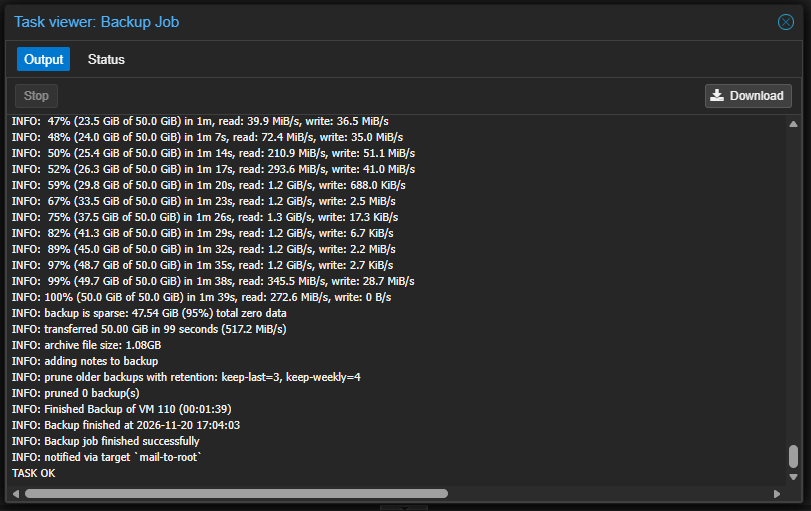
So I manually triggered the scheduled backup job.
The backup completed successfully and returned:
Backup finished successfully
Backup job finished successfully
TASK OK
That confirmed the automated job could successfully back up the selected systems to the external storage.
It also confirmed that the retention policy was being applied.
Maintenance Reporting
The next part of the automation work focused on the Ubuntu Docker VM.
This system now hosts several important workloads, including:
- Portainer
- Uptime Kuma
- FUTO Notes
- Minecraft Survival
- Minecraft Creative
- Kali Linux
Instead of manually checking disk usage, Docker health, and package updates every time I logged in, I created a maintenance-report script.
The script is stored at:
/usr/local/sbin/travelkit-maintenance-report.shand checks several things.
Filesystem Usage
The script reports the root filesystem utilization.
During testing, the Ubuntu VM showed:
174G total
33G used
134G available
20% used
That gives me an immediate indication of whether storage capacity needs attention.
Docker Storage Usage
The report also checks Docker storage usage.
One test showed roughly:
Images:          20.97 GB
Reclaimable:      8.865 GB
Containers:       69.27 MB
Local volumes:   859.6 MB
This is useful because I previously ran into Docker storage pressure while rebuilding the custom Kali image.
Now I can see reclaimable space before it becomes a problem.
Container Health
The script lists running containers and checks specifically for stopped or unhealthy workloads.
During testing, all six Docker containers were running.
The report showed:
Stopped containers: 0
Unhealthy containers: 0
Several services also reported healthy Docker health checks, including:
- Uptime Kuma
- FUTO Notes
- Minecraft Survival
- Minecraft Creative
Available Updates
The maintenance report also checks for available Ubuntu packages.
Instead of automatically installing them, the script simply reports what is available.
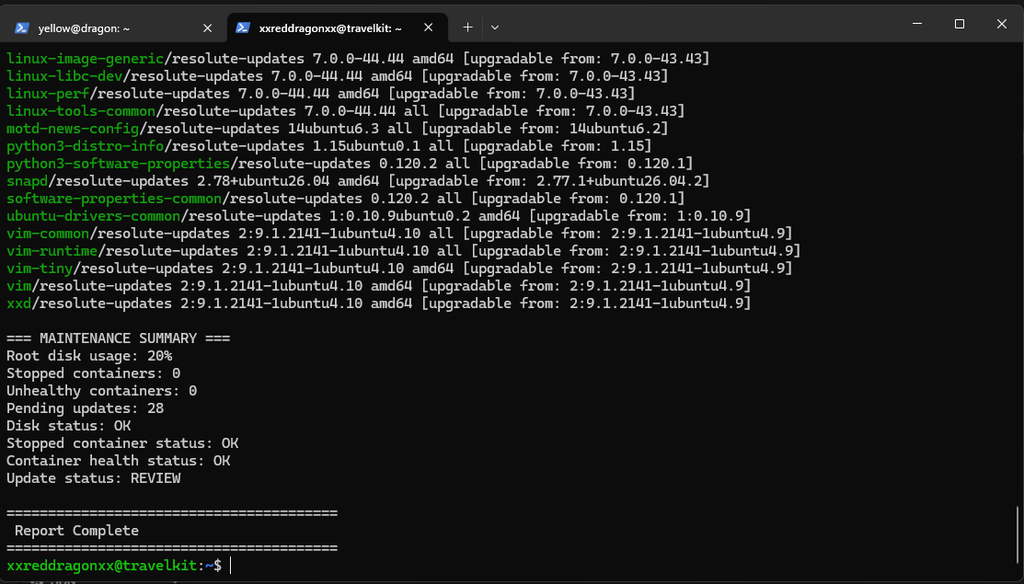
During testing, it found 28 pending updates, including:
- Docker components
- Linux kernel packages
- system packages
- firmware-related packages
- several standard Ubuntu utilities
I intentionally did not automate installation.
For this environment, visibility is more valuable than blindly applying changes.
Adding a Maintenance Summary
Raw command output is useful, but I wanted the report to quickly tell me whether anything required attention.
So I added a summary section.
An example report looked like:
=== MAINTENANCE SUMMARY ===
Root disk usage: 20%
Stopped containers: 0
Unhealthy containers: 0
Pending updates: 28

Disk status: OK
Stopped container status: OK
Container health status: OK
Update status: REVIEW
That means I can scroll to the bottom of the report and immediately see what needs attention.
Scheduling the Report
The maintenance report is automated through cron.
It runs daily at:
07:00and writes a dated log under:
/var/log/travelkit-maintenance/The output files look like:
report-2026-11-21.logA second cron job runs shortly afterward and deletes reports older than 30 days.
That prevents the maintenance logs themselves from becoming another storage problem.
The scheduled tasks are:
Daily maintenance report
30-day log retention cleanup
What I Chose Not to Automate
One of the more important decisions in this part was deciding what not to automate.
I did not enable automatic:
apt upgrade- Docker image pruning
- container restarts
- aggressive cleanup
- unattended infrastructure changes
Those actions can save time, but they can also introduce problems without warning.
For the travel kit, I prefer:
Automation detects
Human reviews
Human approves
That keeps the system maintainable without giving the automation enough control to create its own outage.
What Part 12 Added
The Data Center in a Bag now has:
- scheduled Proxmox backups
- backup retention
- validated automated backup execution
- daily Ubuntu maintenance reports
- filesystem usage monitoring
- Docker storage reporting
- stopped-container detection
- unhealthy-container detection
- pending-update visibility
- a simple maintenance summary
- 30-day maintenance-log retention
This part did not add another major application.
Instead, it made the existing environment easier to operate.
That feels like an important milestone for the project.
Earlier parts focused on building more capability.
Part 12 focused on making the capability sustainable.
The Data Center in a Bag is now starting to maintain itself — while still leaving the important decisions in my hands.