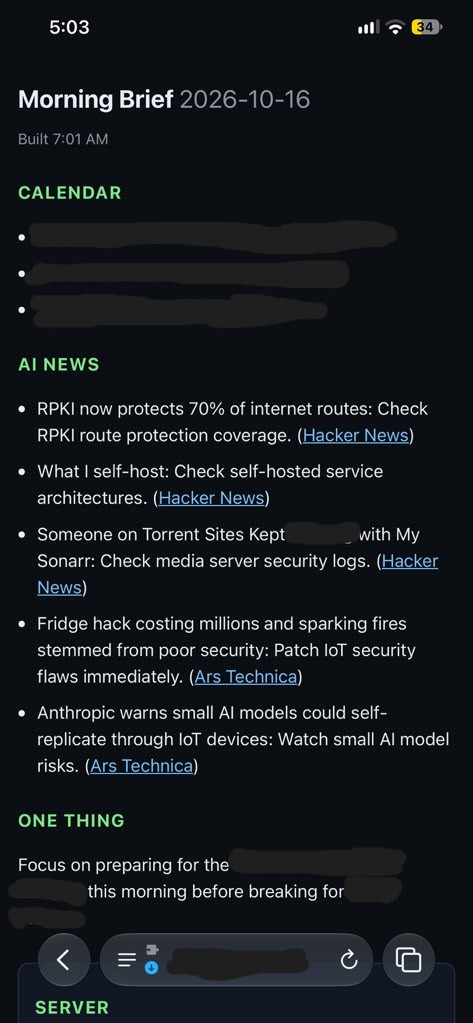
Phase 2 of my “JARVIS OS” project: a read-aloud morning brief and a server health check that only speaks up when something is new.
In Phase 1 I built a daily brief that lands in a notes vault. That’s useful, but I still had to go open it. Phase 2 removes that step: the brief is on a page I can reach from my phone, my phone reads it to me, and my server tells me when something needs attention.
What it does
Every morning, with no input from me:
- 6:00 AM: my iPhone pushes today’s calendar to my home server.
- 7:00 AM: the server builds the brief (same one-request design as Phase 1).
- 7:10 AM: a health check inspects the server and pings my phone if something new is wrong.
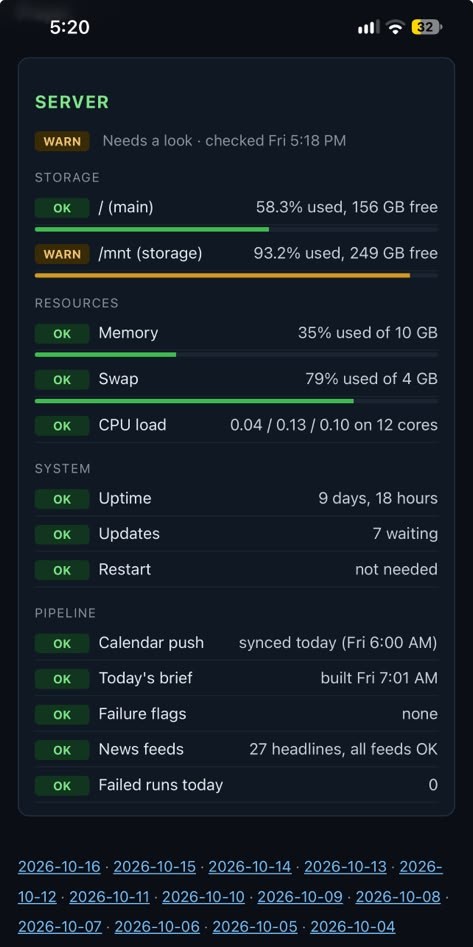
- 7:12 AM: a script renders the brief and a Server card into a small static web page, plus a plain-text version for reading aloud.
- 7:45 AM: an iPhone Shortcut fetches the text and reads it aloud, even with the screen locked.
vault/outputs/brief.md  --+
brief-data/health.json  --+--> render_brief.py --> brief-site/ (nginx, LAN/VPN only)
                                                      |-- index.html (brief + Server card)
                                                      '-- latest.txt --> iPhone Shortcut --> speaks
health_check.py --> ntfy ping (new problems only)
The stack (still free)
- Page: nginx:alpine in Docker serving static files, reachable only from my home network and VPN
- Health check and page builder: standard-library Python, no root, no database
- Alerts: self-hosted ntfy, same as Phase 1
- Voice: an iOS Shortcut (Get Contents of URL, then Speak Text)
- Scheduling: cron
What the health check watches
Disk usage on two drives, memory, swap, CPU load, pending updates (and security updates), whether a restart is required, and the brief pipeline itself: was the calendar synced today, did the brief build, are there failure flags, did all the news feeds respond. Thresholds sit in one block at the top of the script. I left Docker containers out on purpose, since checking them would need access to the Docker socket and I didn’t want to hand that over for a nice-to-have.
Design choices that mattered
Ping once per problem
A monitor that repeats itself gets muted. The check remembers what it has already announced. A new problem pings once and a critical one pings immediately. After that it only shows on the page, and a reminder goes out if it’s still there after seven days. The spoken morning alert follows the same rule, so the brief doesn’t open with the same warning every day.
Make the text speech-safe
Text that looks fine on screen can sound wrong aloud. Curly quotes and dashes came out as garbage characters, so everything is normalized to plain ASCII. Markdown and links are stripped, and the source name after each headline is gone because it made every item drag. The spoken version also renames “One Thing” to “Your focus today.”
Fail loudly
If the health data is more than 26 hours old, the page shows a warning rather than a stale all-clear. If the latest brief isn’t from today, the page says so and the spoken version opens with a warning.
Order of operations matters
My first schedule ran the health check a minute after the brief build started. The brief hadn’t finished yet, so the page showed a red “today’s brief is missing” alert all day over a brief that was sitting right above it. Giving the brief ten minutes before the check runs fixed it. Screenshotting my own dashboard is how I caught it.
Test without burning the alert
The health script has --dry-run (print only) and --no-notify (write the page data without sending a ping or recording that it was announced). That let me test the whole chain and still have the first real alert fire on schedule.
Security choices
- The page is read-only and has no login, which is acceptable only because it’s reachable from my LAN and VPN. It isn’t exposed to the internet.
- The health check needs no root and reads only standard system files.
- Alerts stay generic. A push says “/mnt is 93% full,” never meeting titles or headlines.
- No Docker socket access for the monitor.
Where it stands
The first real health run fired on schedule and flagged a storage drive at 93% full, which I hadn’t noticed. The read-aloud Shortcut works on a locked phone, and it works away from home: the calendar push ran while I was out at 6 AM, and the brief read itself to me on my drive to work.
What I’d tell you if you build this
- Alert on change, not on state. Otherwise you’ll learn to ignore it.
- Test the speech path, not just the screen.
- Make every failure visible somewhere, even if it doesn’t deserve a ping.
- Build in a dry-run mode before anything that sends notifications.
What’s next
- A better voice. Enhanced iOS voices now, local text-to-speech later.
- An interactive dashboard with the brief, schedule, and server health on one page.
- Expansion. A phone-call version of the brief, homelab status in the daily note, and turning raw captures into linked wiki notes.
If you want a cleaned-up copy of the scripts, get in touch.