What started as a portable Proxmox server has officially become my Data Center in a Bag project.
For Part 6, the goal sounded simple: make the Minecraft Bedrock servers behind pfSense accessible to devices connected to the GL.iNet Opal.
The final network design looked like this:
GL.iNet Opal LAN
192.168.8.0/24
        |
        | pfSense WAN: 192.168.8.20
        |
      pfSense
        |
        | LAN: 10.20.20.1/24
        |
Protected Network
10.20.20.0/24
The Ubuntu VM hosting Docker and the Minecraft servers lives at:
10.20.20.20with:
Survival: 19132
Creative: 19142
The Original Plan: Port Forwarding
My first thought was the obvious one: create NAT rules in pfSense and forward the required Minecraft ports from the pfSense WAN address to the Ubuntu server.
Normally that would be a pretty straightforward solution.
This time, not so much.
While troubleshooting, I ran into one of the bigger changes in recent Minecraft Bedrock Dedicated Server releases: NetherNet.
The servers were no longer behaving like the older RakNet setup where I could simply expose a UDP port and call it a day.
For Survival, I ended up testing:
TCP 19132
UDP 19200-19215
Docker was listening on the correct ports, pfSense had matching NAT rules, and the container was healthy.
Minecraft still would not connect.
Time to Stop Guessing
At that point I switched from changing settings to tracing traffic.
Using packet captures in pfSense, I verified that TCP traffic on port 19132 was making it through the firewall and reaching the Ubuntu server.
I also verified directly on Ubuntu that Docker was listening on:
TCP 19132
UDP 19200-19215
So the basic network path was working.
But the client still failed to establish a game session.
That is where Firezone became one of the most useful troubleshooting tools in the lab.
Firezone Proved the Server Worked
The Data Center in a Bag already has a Firezone gateway inside the protected 10.20.20.0/24 network.
Instead of continuing to fight NAT, I connected the ROG Ally through Firezone and attempted to reach the Minecraft server directly:
10.20.20.20:19132It connected.
That single test told me a lot.
The Minecraft server worked.
Docker worked.
The pfSense LAN worked.
The protected network worked.
The issue was specifically tied to the NAT path.
Routing Instead of Translating
Rather than continuing to force NetherNet through port forwarding, I changed the design.
I added a static route to the GL.iNet Opal:
10.20.20.0/24
via 192.168.8.20
That tells devices connected to the Opal that the protected network lives behind pfSense.
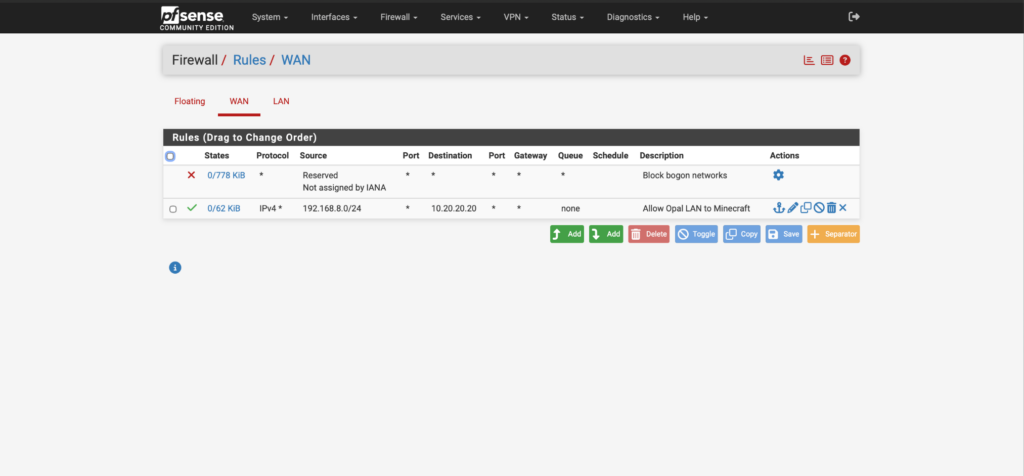
On pfSense, I added a firewall rule allowing the Opal LAN:
192.168.8.0/24to reach the Minecraft host:
10.20.20.20No port forwarding.
No destination NAT.
Just normal routed traffic.
I then connected the Ally directly to:
10.20.20.20:19132and Survival loaded successfully.
Making the Route Permanent
Once I knew the routed design worked, I made the OpenWrt route persistent so the Opal would retain it after a reboot.
The final path became:
Client on Opal
192.168.8.x
        |
        | Static Route
        v
pfSense
192.168.8.20
        |
        | Routing
        v
Protected Network
10.20.20.0/24
        |
        v
Minecraft
10.20.20.20
The old Minecraft NAT rules were then removed from pfSense.
Bringing Creative Over Too
Once Survival was working, I moved on to the Creative server.
Creative was already configured for NetherNet but still had the older UDP-only Docker mapping.
I updated it to use its own dedicated ports:
TCP 19142
UDP 19216-19231
and had it advertise the directly routed address:
10.20.20.20The Ally then connected successfully to:
10.20.20.20:19142At that point both Minecraft servers were working over the new routed architecture.
One Issue Still Remains
The iPhone still refuses to connect successfully.
The exact same Survival server works from the Ally, and direct routing plus Firezone have both confirmed that the server and infrastructure are functioning.
That leaves the current iOS Bedrock/NetherNet behavior as the remaining variable.
I’m leaving that one for another day instead of continuing to tear apart a network that is otherwise working correctly.
What Part 6 Turned Into
This started as a Minecraft access problem.
It turned into a lesson in:
- pfSense firewalling
- NAT troubleshooting
- packet captures
- Docker networking
- NetherNet
- Firezone testing
- static routing
- OpenWrt
- network segmentation
The biggest takeaway was simple:
Port forwarding was not the best solution.

Routing was.
The final design is actually cleaner than what I originally planned.
At this point, the Data Center in a Bag includes:
- Proxmox
- pfSense
- AdGuard
- Firezone
- Ubuntu
- Docker
- Portainer
- Survival Minecraft
- Creative Minecraft
- a routed management/protected network design
And the funny part is that this whole thing started with an old laptop I wanted to carry with me on trips.
Part 7 will probably take the project another step further with VPN work inside pfSense.