I recently completed a major update to hbtechsolutions focused on making the site more interactive, useful, and easier to navigate for visitors, recruiters, and anyone interested in my technical background.
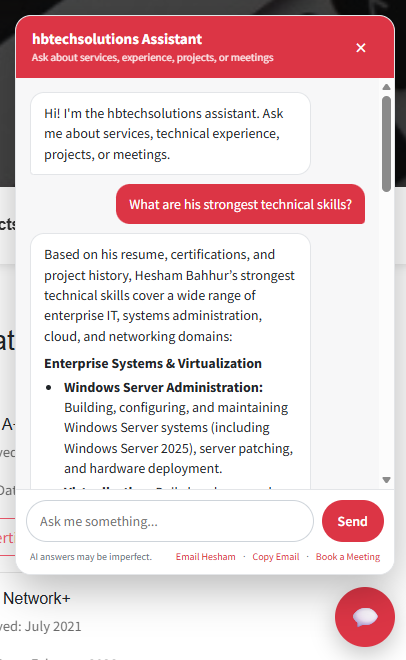
The biggest addition is a custom AI-powered chatbot built specifically around the content on hbtechsolutions.
Rather than acting as a generic AI assistant, the chatbot is designed to answer questions about my professional experience, certifications, education, technical skills, projects, and services using information pulled directly from my website and project portfolio.
Visitors can ask questions such as:
- What technologies does Hesham have experience with?
- Does he have professional VMware experience?
- What has he done with Microsoft Entra ID?
- Does he know PowerShell?
- What experience does he have with Veeam Backup & Replication?
- What MDM platforms has he worked with?
- What projects has he completed?
- What type of IT roles is he qualified for?
The chatbot has also been tuned to distinguish between professional enterprise experience and personal lab or portfolio projects.
For example, if a technology has been used professionally at Orion Financial and also in my home lab, the assistant prioritizes the professional experience first and then adds the lab experience as supporting context.
How It Works
The chatbot backend is self-hosted in Docker and built with Node.js and Express.
Instead of maintaining a separate static knowledge base, the system indexes content from both the main hbtechsolutions website and my WordPress project site. When a visitor asks a question, the backend identifies the most relevant pages, retrieves the current content, and provides that information to Google Gemini as context.
The current architecture includes:
- Node.js and Express backend
- Docker containerization
- Google Gemini API integration
- Live website content retrieval
- WordPress sitemap indexing
- Relevance-based page selection
- Local response caching
- Rate limiting
- Nginx Proxy Manager
- Cloudflare
- HTTPS
- CORS restrictions
- Gemini model fallback handling
I also added deterministic responses for common questions such as education, certifications, years of IT experience, contact information, and meeting requests. These responses do not require an AI request, which improves response time and reduces unnecessary API usage.
Recruiter-Focused Improvements
One of my main goals was to make the assistant useful to recruiters.
During testing, I noticed that older project posts could sometimes receive more relevance than my current professional experience. I adjusted the retrieval logic so recruiter-style questions prioritize the current resume and employment information while still using project posts when they provide additional technical context.
This allows the chatbot to better answer questions about technologies I currently work with, including:
- Windows Server 2025
- VMware virtualization
- Microsoft Entra ID
- Microsoft 365
- PowerShell
- AWS
- Veeam Backup & Replication
- Mobile Device Management
- Networking
- SSO integrations
- Automation
- Backup and recovery infrastructure
The assistant can still reference older lab projects involving technologies such as Docker, Linux, Proxmox, VMware ESXi, Windows Server, networking tools, and self-hosted applications, but those projects are now clearly identified as personal or lab experience.
Improved Chat Interface
The chatbot interface itself was also updated to provide a cleaner experience.
It now supports formatted responses with:
- Headings
- Bold text
- Bullet lists
- Source links
- Contact actions
- Email copying
- Meeting booking
Longer technical answers are much easier to read, especially on mobile devices.
Direct Meeting Booking
Alongside the chatbot, I also added direct meeting scheduling through the website.
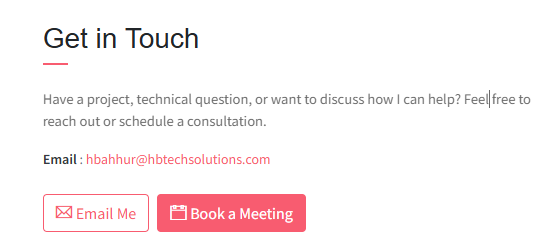
Visitors can now select Book a Meeting from the chatbot or the main contact section and schedule a 30-minute meeting directly.
The site also includes:
- Email Me
- Copy Email
- Book a Meeting
This gives recruiters, potential clients, and other visitors multiple ways to reach me without needing to search through the site for contact information.
What I Learned
This project ended up involving much more than simply connecting a website to an AI API.
Some of the more interesting challenges included:
- Keeping API credentials secure on the backend
- Preventing the AI from inventing experience that is not documented
- Distinguishing professional experience from home-lab experience
- Ranking current resume information above older project posts
- Handling API quota limits and model availability
- Building fallback logic between Gemini models
- Working with reverse proxies and forwarded client IP addresses
- Implementing rate limiting behind Cloudflare and Nginx Proxy Manager
- Building a responsive frontend chat interface
- Rendering AI-generated Markdown safely
- Reducing unnecessary AI requests with local intent handling
- Making responses useful for both technical visitors and recruiters
The project also reinforced something I already value in infrastructure work: good automation is not just about making something work — it is about making it reliable, maintainable, secure, and easy for someone else to use.
Try It Out
The chatbot is now live at hbtechsolutions.com.
Visitors can ask about my professional experience, certifications, technical projects, infrastructure background, or simply use the assistant to get in touch or book a meeting.
This will continue to evolve as I add new projects, technologies, and professional experience to the site.