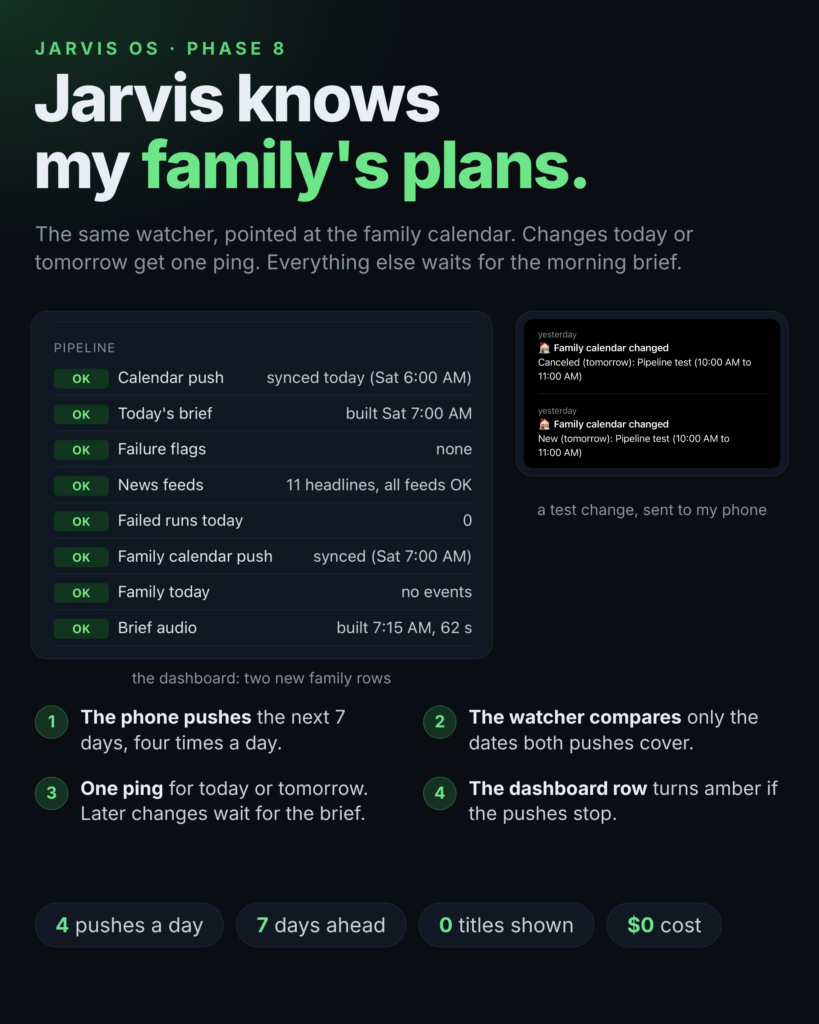
Phase 7 taught Jarvis to watch my work calendar. Phase 8 points the same pipeline at the calendar my family actually uses, and it turned out to teach me more about the pipeline than the first version did.
Where this came from
Back in the Phase 2 planning I wrote down a wish: put my family’s iPhone calendar into the brief, so Jarvis can say what’s happening at home alongside what’s happening at work. Phase 7 built the machinery (a phone push, a watcher, one ping per change). Phase 8 reuses all of it.
The decision: phone push or live
I started out planning to read the calendar live from iCloud. That means an app-specific password on my server, and I found a catch: that password can reach more than one calendar. The clean fix is a second, read-only Apple ID that only sees this one calendar. It’s a good design, and I may build it later. For now I chose the phone push, because it needs no secret on the server and I can test it with sample files. The change-detection code is the same either way, so swapping the source later is cheap.
How it works
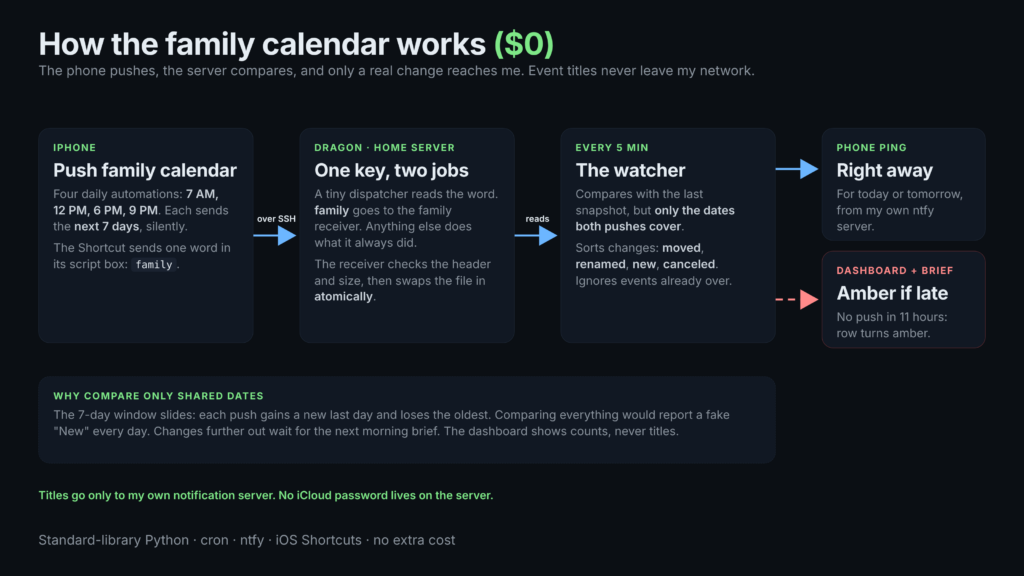
- A Shortcut finds every event in the family calendar for the next 7 days and writes them as plain lines: a date, a time or “all day”, and a title.
- Four automations run it each day: 7 AM, noon, 6 PM and 9 PM.
- A receiver script on the server checks that the data looks right (a header line, a size cap) and replaces the file in one atomic step. Junk is rejected and the old file stays.
- A watcher runs every five minutes. It does nothing unless the file changed.
The part that’s different from Phase 7
Phase 7 watched one day. This one watches seven, and the window slides. Each day’s push has a new last day, and the oldest day falls off. If the watcher compared everything, every push would report “New” for the day that just appeared and “Canceled” for yesterday. So it only compares the dates both pushes cover, and ignores events that have already ended.
The ping policy comes from the same thinking. A change today or tomorrow pings me right away. A change next Friday doesn’t need to buzz my pocket, so it’s saved and read in the next morning’s brief.
The one key, two jobs problem
My work calendar already pushes over an SSH key that can do one thing: overwrite one file. I planned a second key for the family calendar, with the same kind of lock. Then I found that iOS Shortcuts uses a single SSH key for the whole app, and generating a new one would replace the old one and break the work push.
The fix was a small dispatcher. The Shortcut’s script box holds one word. If it says family, the server runs the family receiver. Anything else does exactly what the old forced command did. I tested both paths on sample data first, backed up the keys file, changed the one line, and ran the work push straight afterward to prove it still worked.
Making silence trustworthy
Same rule as Phase 7: the dangerous failure is a quiet one. The dashboard row turns amber if the newest push is more than 11 hours old. The longest normal gap is 10 hours, between the 9 PM push and the 7 AM one. It never pings, it just makes a broken Shortcut visible. A second row shows only how many events are on today, because I don’t want family event titles in dashboard screenshots.
The morning brief
The 7:10 run now adds a sentence to the spoken brief: what’s on the family calendar today, with times. It’s built from the file with plain Python. No AI sees it. Changes the watcher saved quietly are read once, the next morning, and then cleared.
Mistakes worth sharing
- A Shortcut date went blank without an error. The header showed an empty date. I stopped guessing and added temporary “Show Content” steps to see each value. The first one was empty, and storing it in a named variable fixed it.
- Apple renamed “Show Result”. It’s now “Show Content”. I searched for the old name and spent a minute thinking the action was gone.
- A rename that swapped the wrong variable. In the Shortcut editor I renamed a result when I meant to switch inputs, and the header date silently came from the wrong place. Naming the date
ThroughDatemade the mix-up obvious.
Did it work?
I tested the whole chain without touching the shared calendar. I wrote a made-up event on the server. The watcher saw it and my phone got “New”. Then I ran the real push, which removed it, and the phone got “Canceled”. Both arrived. The noon and 6 PM automations ran by themselves the same day, and the next morning’s 7 AM push showed up on the dashboard too.
I haven’t had a real family change yet, so the real-world test is still ahead. The spoken “family today” line is also still untested out loud, because the first mornings had nothing on the calendar. I’ll report back when a real event shows up.
What it costs
Nothing. Standard-library Python, one cron line, four Shortcut automations and a notification server I already ran.
What’s next
Candidates: an “ask Jarvis” voice Shortcut with a fallback AI, a notes server so Jarvis can write things down, and a pass through my old email. And someday the live iCloud version, with a read-only account.