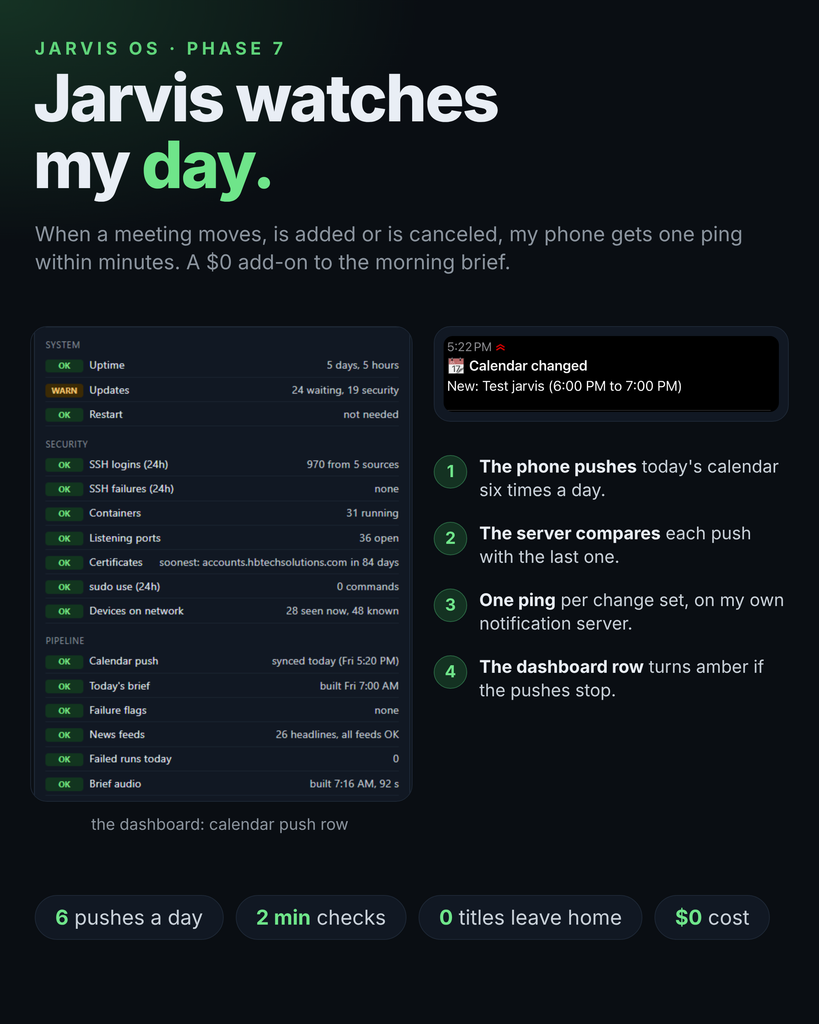
Phase 6 taught Jarvis to watch my servers. Phase 7 points the same pipeline at my calendar, because a morning brief can’t know what changes at 10 AM.
Where this came from
Back in Phase 2 planning I wrote down a wish: if a meeting moves, tell me. The brief reads my calendar once, at 7 AM. Anything that changes after that is invisible until I happen to look.
The constraint: the phone is the only way in
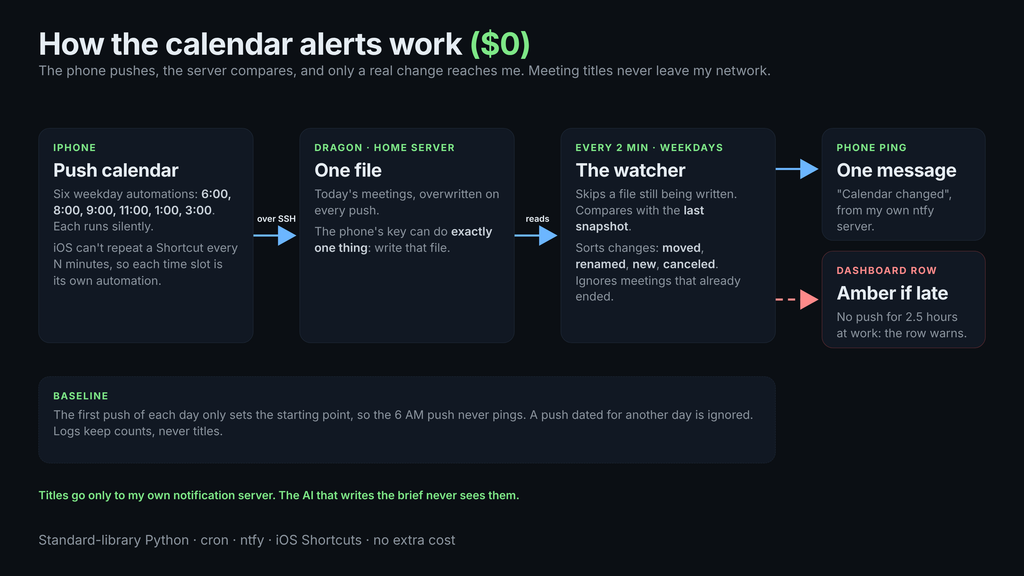
My work calendar lives on my iPhone, and I’m keeping it that way: no credentials on a server, nothing to ask IT for. So the phone pushes. Since Phase 1 a Shortcut has written today’s schedule to a file on my server over a restricted SSH key that can do exactly one thing: overwrite that file.
How often can the phone push?
iOS Shortcuts has no “every 30 minutes”. A Time of Day automation fires once, at one time, repeating daily or weekly. To push more often you create one automation per slot and set each to run on weekdays. I made five new ones: 8, 9, 11, 1 and 3, alongside the original 6:00 AM push. The widest gap is two hours. Each runs silently, with notifications off.
The watcher
A small Python script on the server runs every two minutes during work hours. It does nothing unless the calendar file changed. When it did:
- It reads today’s meetings from the new file and from the saved snapshot.
- It classifies the differences: moved (same title, new time), renamed (same time, new title), new, canceled.
- It ignores changes to meetings that have already ended.
- It sends one phone message, for example “Moved: [meeting], now 11:00 AM to 11:30 AM (was 10:30 AM to 11:00 AM)”, through my own notification server.
The first file of the day only sets the baseline, so the 6 AM push never pings. A file still being written is skipped. A file dated for another day is ignored.
Making silence trustworthy
The dangerous failure here is not a wrong alert. It’s no alerts because the phone stopped pushing, which looks identical to a quiet day. So the dashboard’s “Calendar push” row now turns amber when the newest push is more than two and a half hours old on a weekday between 8:15 AM and 5 PM. It only changes the dashboard and never pings.
Privacy
Meeting titles stay on my network. The ping goes through a self-hosted notification server, and the script’s log records only counts. The AI that writes the brief never sees any of this.
Mistakes worth sharing
- A push collided with the brief. I first set a push for 7:00 AM, the same minute the brief is built. A push overwrites the file, and if the brief read it at that instant it would see an empty file and ignore my calendar. I moved the push to 8:00 AM.
- I trusted a quiet log. After installing, the log showed “no changes” and I nearly treated that as proof pushes were arriving. It wasn’t. The watcher runs every two minutes whether or not the phone pushes. The real proof is the file’s modified time, which is what the dashboard row shows.
- Empty means canceled. If a push contains the date line and no meetings, the script reports everything as canceled. That’s correct if the day is truly empty, and the 15-second settle check guards against half-written files.
A side find: why Jellyfin didn’t come back
Twice after a server reboot, Jellyfin stayed down. The container’s logs said Docker couldn’t mount a network share when it started, because the share wasn’t reachable yet, and Docker doesn’t retry that failure. A small script now runs at boot and retries every 30 seconds for 10 minutes. I haven’t proven it yet: the next reboot is the test.
Did it work?
I tested the whole chain with a made-up calendar event. I added it on my phone and ran the push by hand. About two minutes later my phone had “New: [event] (6:00 PM to 7:00 PM)”. I deleted the event, pushed again, and got “Canceled: [event]”. The first message had arrived but my phone’s silent mode kept the banner hidden, so I thought it had failed until I opened the notification app and saw it waiting. If your alerts seem missing, check the app’s message list before debugging the server.
I haven’t had a real meeting move yet, so the real-world test is still ahead. I’ll report back after the next reboot on whether the Jellyfin retry works.
What it costs
Nothing. Standard-library Python, one more cron line, a few Shortcuts and a notification server I already ran.
What’s next
Candidates: the family calendar (same change detection, different source), an “ask Jarvis” voice shortcut, and a notes server so Jarvis can write things down. The next phase gets picked by what annoys me most.