Part 9 of the Data Center in a Bag project turned the travel kit into something I’ve now been actively using for PenTest+ study.
After building the Kali Linux container earlier in the series, I wanted to take it one step further.
The goal was to create a deliberately vulnerable target that Kali could attack without putting that vulnerable system on the same network as the rest of the travel environment.
In other words:
I wanted a pentest lab inside the Data Center in a Bag — but I wanted it isolated.
The Design
The main protected network for the travel kit is:
10.20.20.0/24Kali already lives there at:
10.20.20.30That gives Kali normal access to:
- pfSense
- AdGuard
- Internet access
- updates
- SSH management
- the rest of the protected environment
For the pentest lab, I created a second isolated network:
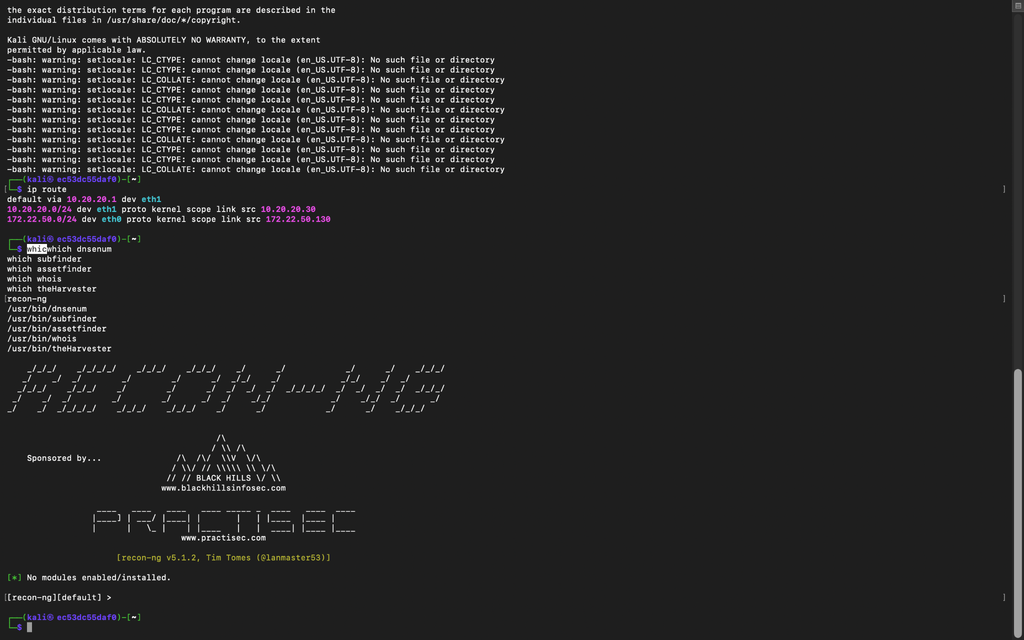
172.22.50.0/24Kali also has an interface on that network:
172.22.50.130and the vulnerable target lives at:
172.22.50.20So the design looks roughly like this:
Travel LAN / Internet
        |
   10.20.20.30
       Kali
        |
   172.22.50.130
        |
  Pentest Lab
 172.22.50.0/24
        |
   172.22.50.20
 Vulnerable Target
Kali effectively sits between two worlds.
One side gives me normal management and Internet access.
The other side gives me a contained attack environment.
Why Isolation Matters
The vulnerable machine is intentionally insecure.
That is the whole point.
I want to be able to:
- enumerate services
- run Nmap scans
- test web applications
- inspect responses
- capture traffic
- practice reconnaissance
- experiment with pentesting tools
without worrying about an intentionally weak system sitting next to the rest of my services.
The vulnerable target does not need to communicate with AdGuard, Firezone, Minecraft, FUTO Notes, or anything else on the travel LAN.
So I kept it on its own network.
Validating the Segmentation
Before I trusted the setup, I tested it.
The checks confirmed:
- Kali can reach the vulnerable target
- the target stays isolated from the normal travel LAN
- the target does not have an unintended normal Internet path
- Kali keeps its regular Internet access through pfSense
- the isolated pentest network remains separate from the rest of the environment
At that point, it stopped being an experiment.
I started using it for actual PenTest+ study sessions.
Using the Lab for PenTest+ Practice
This has probably been one of the most useful additions to the travel kit so far.
Instead of only watching lessons or reading about enumeration techniques, I can immediately practice against a system I own.
For example, the Kali container can reach the vulnerable target at:
172.22.50.20and I can work through exercises involving tools such as:
nmap
curl
tcpdump
dnsenum
subfinder
assetfinder
whois
theHarvester
Recon-ng
I’ve also been adding tools directly into the custom Kali Docker image so they survive container rebuilds.
That means the Kali container is becoming a repeatable portable pentesting toolbox rather than something I have to rebuild manually each time.
Dual-Homed Kali
One interesting issue came from giving Kali two networks.
Kali now has:
Travel LAN:
10.20.20.30

Pentest Lab:
172.22.50.130
During one of the rebuilds, the container lost its default route.
It knew how to reach both directly connected networks, but it no longer knew which interface should handle normal Internet traffic.
The fix was to explicitly make the travel LAN the preferred gateway.
The final routing behavior became:
Default Internet traffic
-> 10.20.20.1 through the travel LAN

Pentest traffic
-> 172.22.50.0/24 through the isolated interface
That restored Internet access for Kali while preserving the isolated lab path.
It was a good reminder that multi-homed systems need deliberate routing.
A Custom Kali Image
The Kali container has also evolved quite a bit.
Instead of relying only on the base Kali image, I’m maintaining a custom image that includes the tools I’m actively using.
Current additions include tools such as:
Recon-ng
dnsenum
subfinder
assetfinder
whois
theHarvester
tcpdump
SSH tooling
along with the standard Kali toolset.
The idea is simple:
If the container gets rebuilt, the toolbox should come back with it.
What Part 9 Added
The Data Center in a Bag now includes:
- an isolated pentest network
- a deliberately vulnerable target
- a dual-homed Kali container
- separate management and attack paths
- persistent pentesting tools
- working Internet access for Kali
- no normal Internet path for the vulnerable target
- a lab I’m actively using for PenTest+ study
This part moved the project beyond infrastructure experimentation.
The travel kit is now carrying its own security training environment.
I can SSH into Kali, enumerate an isolated target, capture traffic, test tools, and practice concepts from my PenTest+ studies without putting the rest of the environment at unnecessary risk.
The Data Center in a Bag keeps growing.