Part 8 took the Data Center in a Bag back to the firewall.
After getting the network architecture cleaned up, routing the protected LAN properly, and adding Kali Linux as a portable security toolbox, I wanted to tackle something that had been on the list for a while:
VPN-based Internet access through pfSense.
But I did not want to simply send the entire travel lab through a commercial VPN.
I wanted pfSense to decide which systems used the VPN and which systems continued using the normal Internet connection.
That meant building policy-based routing.
The Goal
The protected side of the Data Center in a Bag lives on:
10.20.20.0/24Some of the current systems include:
10.20.20.1   pfSense
10.20.20.2   AdGuard
10.20.20.3   Firezone
10.20.20.10  Linux Mint
10.20.20.20  Ubuntu / Docker
10.20.20.30  Kali
Instead of changing the behavior of the entire network at once, I used the Linux Mint VM at 10.20.20.10 as the test machine.
The design was simple:
Normal systems
      |
      v
   pfSense
      |
      v
 Normal WAN


Linux Mint
10.20.20.10
      |
      v
   pfSense
      |
      v
   PIA VPN
      |
      v
   Internet
This gave me a controlled way to test VPN routing without risking services like Firezone, AdGuard, Docker, or Minecraft.
Adding Private Internet Access to pfSense
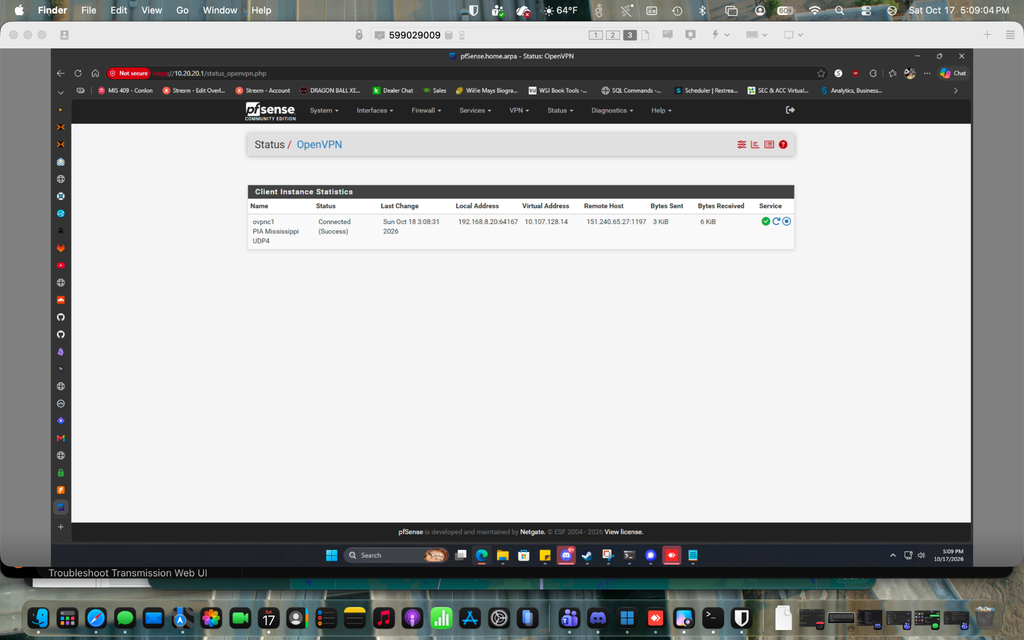
I generated a manual OpenVPN configuration through Private Internet Access using a nearby Mississippi endpoint.
The connection used:
UDP 1197
AES-256-GCM
RSA-4096
I imported the PIA certificate authority into pfSense and created an OpenVPN client using the generated configuration.
One of the important decisions was preventing the VPN client from replacing pfSense’s normal default route.
The standard WAN needed to remain the default Internet path.
The PIA connection would instead become an additional gateway that pfSense could use only when instructed.
Once the client was configured, pfSense successfully established the OpenVPN tunnel.
Creating a Dedicated VPN Interface
I assigned the OpenVPN connection as its own pfSense interface:
PIA_VPNThat also created a dynamic IPv4 gateway for the tunnel.
At this point, pfSense effectively had two outbound paths available:
Normal WAN
PIA VPN
Now I could choose between them with firewall policy.
Outbound NAT
Routing traffic toward a VPN gateway is only part of the process.
The traffic also needs to be translated correctly as it exits the tunnel.
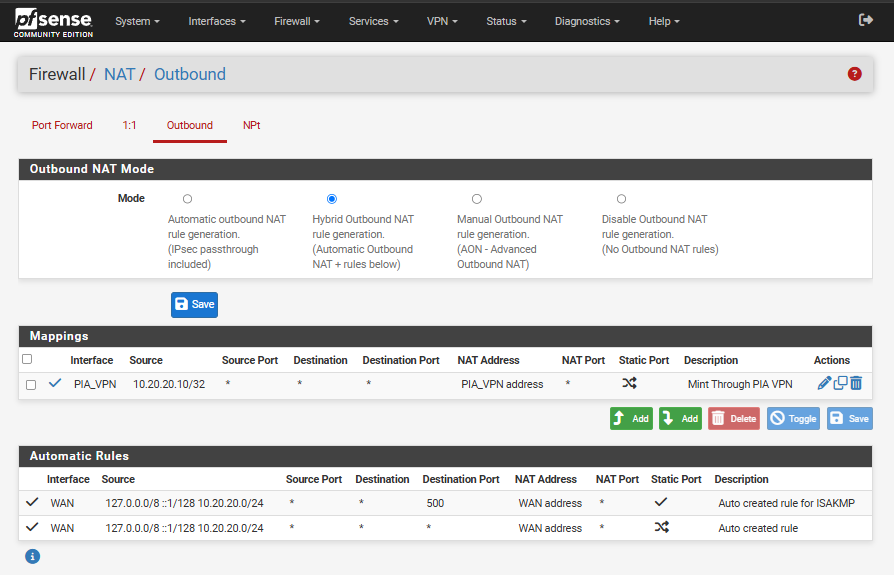
I changed pfSense to Hybrid Outbound NAT and created a specific NAT rule for Mint:
Source:
10.20.20.10/32

Interface:
PIA_VPN

Translation:
PIA_VPN address
Hybrid mode was useful because pfSense could continue generating its normal WAN NAT rules automatically while I added custom mappings for the VPN.
Policy-Based Routing
Next came the actual routing decision.
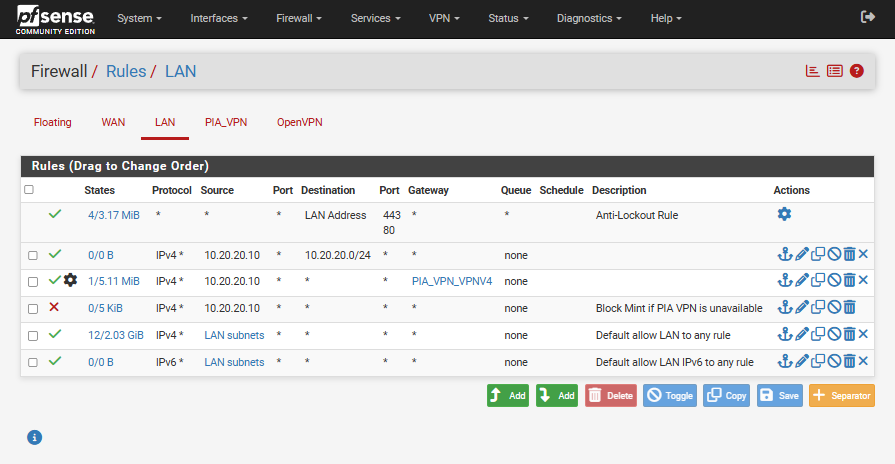
On the LAN firewall rules, I created a rule specifically for Mint and assigned the PIA gateway to it:
Source:
10.20.20.10

Destination:
Any

Gateway:
PIA_VPN
That rule sits above the normal LAN-to-Internet rule.
So when Mint sends Internet traffic, pfSense catches it first and sends it through PIA.
Other systems continue matching the normal rules and leave through the standard WAN connection.
That is the part of this setup I really like.
The VPN is not an all-or-nothing setting.
It is a routing decision.
Verifying the Route
To verify it, I compared the public IP address from Mint with another system still using the normal WAN.
The regular system continued showing my normal ISP public address.
Mint returned the PIA exit address instead.
That proved the two systems were using different Internet paths despite living behind the same firewall.
Adding a Kill Switch
Getting Mint onto the VPN was only half of the goal.
The next question was more important:
What happens if PIA goes down?
I did not want Mint to quietly fall back to the normal WAN connection.
If I deliberately tell pfSense that a system must use the VPN, a VPN failure should not turn into an accidental traffic leak.
So I added a block rule underneath the PIA routing rule.
The final logic became:
If PIA is available:
Mint -> PIA -> Internet

If PIA is unavailable:
Mint -> Internet BLOCKED
The normal LAN rules still allow Mint to communicate with local systems.
So even with the VPN unavailable:
Mint -> Internet
Blocked

Mint -> Local 10.20.20.0/24 resources
Working
That gave me exactly the fail-closed behavior I wanted.
Why Policy Routing Was Worth It
I could have put the entire travel kit behind a VPN and called it finished.
But that would have created new problems.
Infrastructure services such as Firezone and AdGuard may be better served by keeping their normal WAN path. Other systems may benefit from using PIA.
With policy routing, I can make that decision per host.
For example:
AdGuard        -> Normal WAN
Firezone       -> Normal WAN
Ubuntu/Docker  -> Normal WAN
Mint           -> PIA VPN
Kali           -> Either, depending on the task
That flexibility makes pfSense much more useful than simply having a VPN client installed on individual devices.
What Part 8 Added
Part 8 added:
- Private Internet Access through pfSense
- OpenVPN integration
- a dedicated VPN interface and gateway
- Hybrid Outbound NAT
- host-specific policy routing
- selective VPN Internet access
- a fail-closed VPN kill switch
- continued local network access during VPN failure
The biggest takeaway from this part was that adding a VPN and controlling a VPN are two very different things.
I didn’t just want:
VPN = ONI wanted:
This system uses the VPN.
That system doesn't.
And if the tunnel fails, traffic doesn't leak.
That is now part of the Data Center in a Bag.
At this point, the project is behaving less like a laptop with some VMs and more like a small portable infrastructure environment.
And somehow, there is still more to build.