Phase 3 of my “JARVIS OS” project: one dashboard for three servers, with a watchdog that doesn’t depend on what it watches.
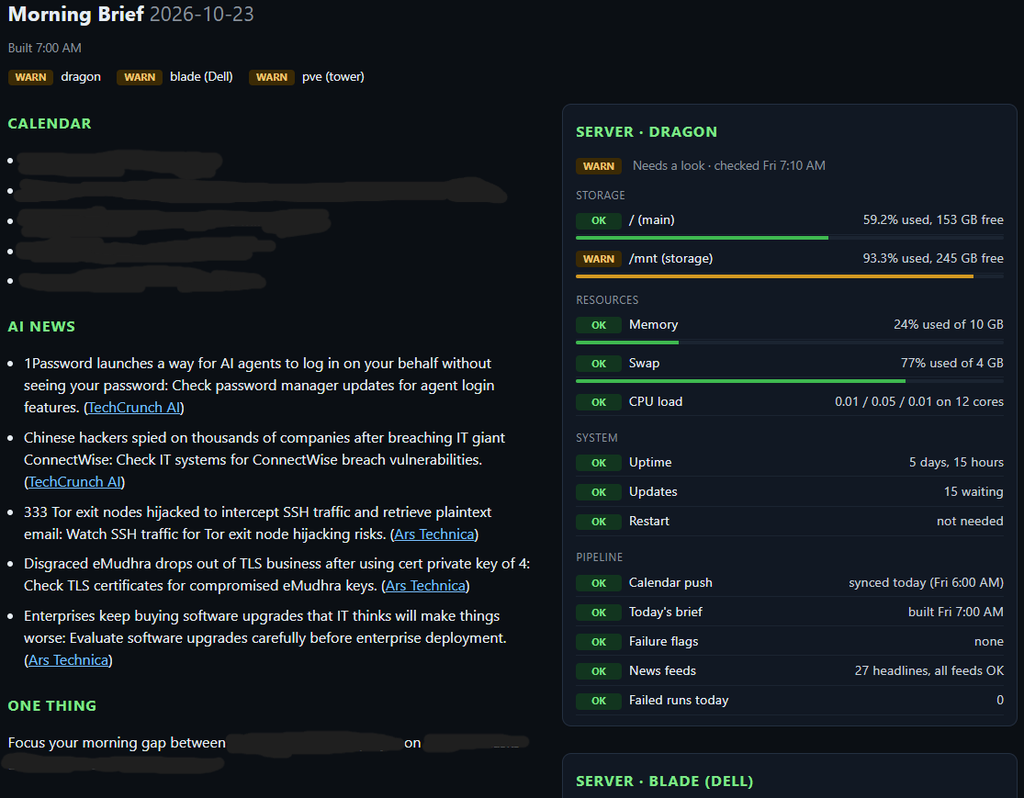
Phase 2 gave my morning brief a voice and a single Server card for my main server. But my lab is bigger than one machine. I run two Proxmox hosts, with a dozen VMs and containers between them, and the main server is itself a VM on one of them. Phase 3 widens the view: every server gets a card, every guest gets checked, and one phone ping tells me when something new is wrong.
What it does
Every morning, with no input from me:
- 6:00 AM: my iPhone pushes today’s calendar to the main server.
- 7:00 AM: the main server builds the brief.
- 7:05 AM: each Proxmox host checks itself and sends its report to the main server.
- 7:10 AM: the main server checks itself, merges all three reports, and pings my phone once per new problem.
- 7:12 AM: the page is rebuilt with all three cards.
- 7:45 AM: the iPhone reads the brief aloud, with a spoken alert if something needs attention.
Separately, every 5 minutes, a small watchdog on one host checks whether the other host is answering.
host A  --health_pve.py--> report -->\
host B  --health_pve.py--> report --->+--> main server: health_check.py --> one ntfy ping
main server --health_check.py--------/                   render_brief.py --> page + read-aloud
host A --watchdog.py (every 5 min)--> is host B answering? --> public ntfy.sh --> phone
The stack (still free)
- Reports: one standard-library Python script, run as root on each Proxmox host, named with options (
--name,--title,--say) so the same file works on both - Merging and the page: the same scripts from Phase 2, extended to read several reports
- Transport: SSH with a key locked to a forced command that writes a single file
- Alerts: self-hosted ntfy for the main server, public ntfy.sh with a secret topic for the watchdog
- Scheduling: cron
What each host checks
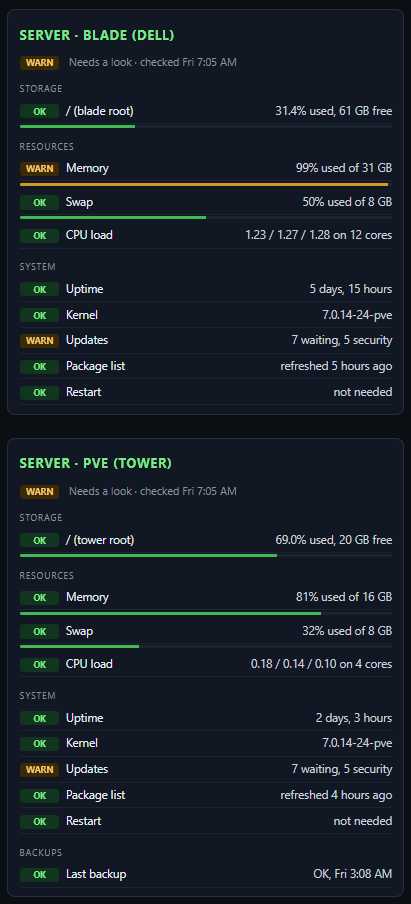
Disk space, LVM thin-pool space and metadata, memory, swap, CPU load, pending updates (and security updates), the running kernel, whether the package list is refreshing, whether every VM and container is running, the last backup job, and whether each Proxmox storage is answering. Thresholds sit in one block at the top of the script. I left per-guest CPU, memory and storage for a later phase.
Design choices that mattered
Don’t let the alarm depend on what it watches
My notification server runs on a VM on the host I most need to watch. If that host dies, the server that would announce it dies too. So the watchdog runs on the other host and sends through a public ntfy service with a secret topic. It needs three misses in a row (about 15 minutes) before it alerts, sends one “down” message and one “back up” message, and repeats only after six hours. A pause file silences it for two hours during maintenance.
One key, one job
The Proxmox hosts are the most powerful machines I own, so they get the least trust. Each one pushes its report to the main server over SSH with a key locked to a forced command that does nothing except write one file. A stolen key can’t read anything or run anything else.
One ping, many servers
The main server merges flags from all three reports and sends one message for each new problem, labeled with the server. The same rule as Phase 2 applies: ping once, stay quiet on the page, and remind after seven days. A remote report that stops arriving is itself a flag after 26 hours.
Check the cause, not just the result
The first full unattended run flagged a failed backup: the backup share on the main server was unreachable. The cause was a stale network mount left behind when the main server restarted during a host reboot. I fixed it with one command, and then added two checks to the script: any Proxmox storage that stops answering gets flagged, and so does a newer kernel installed than the one running. Proxmox doesn’t set a reboot-needed file the way Debian does, so the script compares kernel versions itself.
Test on fake data, then on a real reboot
I fed the scripts canned command output for each scenario before they touched a real host. Then I updated and rebooted both hosts, after checking that every guest was set to start on boot.
Problems the monitoring found while I built it
- An LVM thin pool close to full, which I fixed by trimming unused blocks and clearing old backups
- A package-update job that had quietly stopped working, leaving over a hundred updates pending
- A container backup that failed for lack of space
- A stale network mount after a reboot
None of those would have pinged me before. All of them now would.
Security choices
- The page is read-only and has no login, which is acceptable only because it’s reachable from my LAN and VPN. It isn’t exposed to the internet.
- Forced-command keys. Each host’s key can write one file and nothing else.
- Generic alerts. A push says “memory is 92% used,” never anything private.
- The AI never sees any of this. The health data and the model are separate. The brief is written from news and a calendar, and the server data never goes to a model.
Where it stands
The first full unattended run worked: reports arrived at 7:05, one combined ping landed at 7:10, the page updated, and the brief read itself aloud at 7:45. It has run the same way, with no issues, every morning since. The first ping flagged a real failed backup. I fixed the stale mount with one command, ran the backup by hand, pushed fresh reports, and the Proxmox cards turned green.

What I’d tell you if you build this
- Put the alarm outside the thing it watches.
- Check dependencies, not only outcomes. A failed backup often points to a broken mount or storage.
- Give each machine the smallest key that does the job.
- Test on fake data first, then reboot for real.
What it costs
Nothing right now. Everything runs on free tiers and my own hardware. If the free tier ever went away, my daily brief uses Google’s cheapest Flash-Lite model, and by my rough estimate it would cost about a quarter a month. The monitoring itself never touches a model.
What’s next
- Per-VM watching. CPU, memory and storage for each VM and container.
- An interactive dashboard, so I can tap a server and see its guests.
- A better voice, then a phone-call version of the brief.
- Smarter calendar alerts. A heads-up when an event changes, plus reminders from more of my calendars.
- Notes. A way for Jarvis to capture ideas and summaries into my notes app.
If you want a cleaned-up copy of the scripts, get in touch.